DotNetNuke tutorials, tips and tricks

Tuesday, June 08, 2010

Skinning with DotNetNuke 5 Super Stylesheets Layouts - 12 Videos

In this video tutorial we demonstrate how to use Super Stylesheets in DotNetNuke for quickly and easily designing the layout of your DotNetNuke skin.

Super Stylesheets are ideal for both beginner and experienced skin designers, the advantage of Super Stylesheets is that you can easily create a skin layout which works in all browsers without the need to learn complex CSS techniques.

We show you how to build a skin from the very beginning using Super Stylesheets.
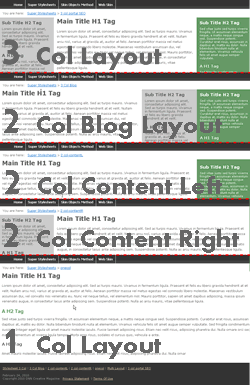
Skinning with DotNetNuke Super Stylesheets The videos contain:

Video 1 - Introduction to the Super Stylesheets DNN Layouts and Initial Setup

Video 2 - Setting Up the Skin Layout Template Code

Video 3 - Using the ThreeCol-Portal Layout Template for a Skin

Video 4 - How to Add Tokens to the Skin

Video 5 - Setting Background Colors for Content Panes and Creating CSS Containers

Video 6 - How to Create a Footer Area and Reset the Default Styles

Video 7 - How to Style the Text in the Content, Left and Right Panes

Video 8 - SEO Skin Layouts for DotNetNuke Tokens

Video 9 - Creating Several Skin Layouts Using the Layout Templates

Video 10 - Further Layout Templates and MultiLayout Templates

Video 11 - SEO Layout Template Skins

Video 12 - Final SEO Positioning of the Skin Code


Skinning with DotNetNuke Super Stylesheets - DNN Layouts

Labels: , , , , , , , , ,

Thursday, August 21, 2008

CSS Reference Book

DNN Creative has released the DNN Creative CSS Reference Book.

This is a 112 page guide which covers how to correctly use all the currently supported CSS properties. Each of the 126 properties is described in full and has examples of their use.

The Reference book comes in pdf format, so it is quick and easy to find the information you need for each CSS Property.

The DNN Creative CSS Reference book is currently available with issue 35 of the DNN Creative Magazine.

Labels: , ,

Wednesday, August 13, 2008

DotNetNuke Print Stylesheets and CSS Reference Book

DNN Creative have released issue 35 of the DotNetNuke Magazine.

This month we show you how to create a print stylesheet for use with your DotNetNuke skin.

There is a built in token within DotNetNuke that allows you to print the content of individual modules, however this is limited as it only lets you print one module at a time.

We show you how to:

  • Create a print stylesheet
  • Format the layout of the print stylesheet
  • Remove unwanted content from the print version of your skin.
This is an essential technique for improving the usability of your DotNetNuke websites.

This tutorial comes complete with 7 videos

Also with this issue, we have produced the DNN Creative CSS Reference Book.

This 112 page reference guide shows examples of how to use each CSS property correctly and also displays the examples as they would appear on the page.

This resource is ideal for beginners and experienced users.

Labels: , , , , , , , , ,

Monday, July 07, 2008

5 Free XHTML Compliant Pure CSS DotNetNuke Skins

Dnn Creative have released issue 34 of the DotNetNuke Magazine.

This month we have converted 5 open source html templates into DotNetNuke skins.

These skins have been chosen due to their different design and CSS techniques used. Each of these designs used a different approach while converting them to a DNN skin, so you will be able to view the code and learn from this variety of implementations.

Skins:

Lazy Days

Zenlike

Bitter Sweet

Greenery

Dark Ritual

Viewing the code from a variety of designers helps to improve your CSS skills and learn multiple techniques for manipulating the layouts and styling of CSS skins in DotNetNuke.

Labels: , , , , , ,

Tuesday, January 08, 2008

Create your own DotNetNuke Skin

If you are looking to create your own DotNetNuke skin there are several tutorials available which will walk you through from the very beginning through to advanced skinning techniques.

If you look at Issues 5 and 6 - Working with skins this introduces you to the basics of DotNetNuke skinning, where you are introduced to the concepts of skinning, setup preparations, and how to create a skin and container using tables.

Once you have got to grips with the basic techniques further advanced techniques are developed in Issue 7 – Developing and enhancing skins where you can learn how to create resizable text, how to test the skins, standard compliance modes.

Pure CSS skinning is then taught in Issue 9 – Advanced Content Styling Techniques and CSS and the following issues, more advanced techniques of CSS skinning are demonstrated in Issue 25 – Pure CSS SEO Layouts for DotNetNuke skins

There are thousands of free CSS XHTML templates available, if you wish to convert one of those templates into a DotNetNuke skin you can learn how to do that in
Issue 28 - CSS Skinning from a XHTML Template, OpenForce 07, Podcasts - part 2
Issue 27 - CSS Skinning from a XHTML Template, OpenForce 07, Podcasts

If you wish to learn DotNetNuke skinning we recommend that you view the issues released on DNN creative magazine in issue number order as each issue builds on the knowledge taught in the previous issues.

Labels: , , , , , , , , ,

Monday, January 07, 2008

DotNetNuke CSS Skinning from a XHTML Template, OpenForce 07

This tutorial is in two parts, part 1 covers how to transfer the structure of an XHTML template into a DotNetNuke skin and how to adapt it to create the content panes, the menu and various DotNetNuke tokens and part 2 (released in the next issue) covers how to create the containers, semantically coding the content, styling and formatting the content, overriding the DotNetNuke default classes, how to easily add the additional skin layout variations, and how to setup and create a print.css file so that you can style your own print layout of the skin.

The tutorials demonstrate the skinning presentation that Lee Sykes gave at the OpenForce conference, except for in much more detail! The skinning demonstration at the conference was 30 minutes; we have turned this into 2 x 1 hour video tutorials.

Checkout:
How to create a DotNetNuke CSS skin from an XHTML template – part 1

How to create a DotNetNuke CSS skin from an XHTML template – part 2

Labels: , , , , , , , , ,

Wednesday, November 21, 2007

DotNetNuke Deployment and Synchronization, Admin Menu Access and Free CSS Skin

In issue 26 of DNN Creative Magazine we explore the development and deployment of a DotNetNuke website, how to synchronise a local installation with a live installation.

This allows you to update the content on the live or local installation and keep both versions in sync without taking the live site offline.

We also demonstrate how to set access to the admin menu so that users can access elements of the menu without the need for full administration privileges.

To finish, we have also included a new pure CSS XHTML skin.

How to synchronize local and live DotNetNuke installations
(Deployment using Red Gate Data Compare software)
(4 videos – 33mins)

How to limit access to the admin menu
(Video - 11min)

Free CSS Skin – Internet Sharing

Labels: , , , , , , , ,

Tuesday, October 02, 2007

Pure CSS SEO Layouts for DotNetNuke skins

Issue 25 of DNN Creative Magazine has been released. - This is our second year anniversary!

In this issue we demonstrate how to create advanced pure CSS search engine optimized skin layouts.

These techniques were developed for the new DNN Creative skin. Following the release of the DNN Creative skin we have responded to the requests of our subscribers for tutorials covering how to create these SEO CSS skins.

Continuing the SEO CSS skin layout tutorials we also explore multiple skin layout techniques and reducing CSS code through the skinname.css file.

These are advanced and flexible techniques for improving your pure CSS skins.

This issue comes complete with 8 videos.

Pure CSS SEO Layouts for DotNetNuke skins
(7 videos – 64mins)

Multiple skin layouts using skinname.CSS
(1 video – 8mins)

Labels: , , , , ,

Tuesday, September 25, 2007

DotNetNuke Skinning Help

In the DNN Creative forum one of the common problems that users come across is working with skins. Usually they are quite simple solutions that take a couple of minutes to find. I have outlined the techniques that I use for troubleshooting DotNetNuke skins in 2 video tutorials.

These techniques can literally save you hours of banging your head on the keyboard! I use these techniques every day and without them it would take me much longer to develop a skin.

If you are interested in looking at these techniques check out: Troubleshooting DotNetNuke skins using the web developer toolbar

Hope you find them useful...

Labels: , , , ,

Tuesday, August 07, 2007

5 Free CSS XHTML Compliant DotNetNuke Skins

We have now completed the changeover to the new pure CSS skin for DNN Creative, so for issue 23 we have released 5 free pure CSS XHTML compliant skins for DotNetNuke.

These skins are open source html templates which we have converted to DotNetNuke skins.

Viewing the code from a variety of designers helps to improve your CSS skills and learn multiple techniques for manipulating the layouts and styling of CSS skins....

Skins:

Andreas 01

Andreas 09

Summer Breeze

FreeStyle

Curiously Green

View all skins live

Hope you find them useful.

Labels: , , , ,

Wednesday, July 25, 2007

DNN Creative new skin launched

Well, it's now finally complete! - Have a look at www.dnncreative.com

You can see the new pure CSS skin in action. You will see that the skin is XHTML compliant, is semantically coded, uses sIFR for headings, and a print.css file so that the articles can be easily printed out. The skin is also flexible and stretches to the size of the browser window and also makes use of font resizing.

Behind the scenes if you look in the source code you will see that the main content is presented before any of the less important elements, making it ideal for the search engines to more easily index the pages.

I don't yet know how Google has reacted to the changeover, but fingers crossed it will like the new layout ;-)

Let us know what you think...

Labels: , , , , ,